When the Lights Go, So Does Everything Else
It's a busy Thursday morning. Your team is processing orders, sending invoices and preparing deliveries. Then, without warning, the power goes out.
Your office server shuts down. Nobody can access shared files, check stock records, or use the accounting system. The UPS might keep things running for a few minutes, but if the generator doesn't start, work stops.
For many Kenyan businesses, this is a familiar problem.
But what if your business systems could keep running even when your office has no electricity?
Moving your office server online with a solution like HostAfrica's Windows VPS can make this possible. It won't keep your office computers or Wi-Fi running during a blackout. However, your hosted systems will remain available, allowing employees to work from somewhere with power and internet.
Key Takeaways: Move Your Office Server Online
- Power cuts can stop business operations when important systems depend on one office server.
- Moving your server online means hosting business systems in a data centre with backup power.
- Employees can access those systems remotely, provided they have power and internet.
- Not everything needs to move. Printers, CCTV recorders and other physical equipment can stay in the office.
- Backups, security and proper planning are essential before making the move.
What Power Cuts Really Cost Your Business
When KPLC announces a planned interruption, businesses start preparing. You might arrange generator fuel, check the UPS, or ask employees to finish important work early.
But have you considered the actual cost?
Think about a business with 15 employees. If a power outage stops everyone from working for two hours, that's 30 working hours lost.
Then there are other expenses:
- Delayed orders and invoices: Customers wait because staff can't access important systems.
- Generator costs: Fuel, servicing and repairs add up.
- UPS maintenance: Batteries eventually need replacing.
- Hardware damage: Sudden shutdowns can damage equipment or corrupt files.
- Lost opportunities: Customers may go elsewhere when you can't serve them.
The real question isn't just how much you're spending on backup power. It's how much your business loses when its systems become unavailable.
The Other Problem: Your Office Server Is Getting Old
Many Kenyan businesses still rely on servers installed years ago. These machines may now be supporting more employees, larger files, and more demanding software than they were designed for.
Some also run older systems such as Windows Server 2012 R2, Exchange Server 2016, or SharePoint Server 2016. Others may still depend on a Skype Server for communication or older Microsoft Office applications.
The problem is that older software eventually reaches the end of its support. This means the manufacturer stops providing regular security updates, leaving your business more exposed to security risks.
For example, Windows Server 2012 R2 reached the end of extended support in October 2023. Exchange Server 2016 also reached the end of support in October 2025.
If your server's aging, replacing the physical machine isn't necessarily your only option.
It's worth asking: Does our server still need to be in the office?
What Does It Mean to Move Your Office Server Online?
Moving your office server online means hosting your business applications and files in a data centre instead of keeping them on a physical machine in your office.
One way to do this is through a Virtual Private Server (VPS), which works like a regular server but runs in a data centre with backup power and reliable connectivity.
Think of mobile banking. You don't need to visit your bank to access your money. Similarly, your employees can access business systems online from anywhere with an internet connection.
Hosting your VPS in Kenya can also help provide faster access for local employees. You can learn more about how this works in our VPS hosting guide.
What Should Move Online, and What Should Stay?
Not everything needs to move online. The goal is to keep important business systems accessible while leaving physical equipment, such as printers and CCTV, in the office.
Here's a simple guide:
| What's on your server? | Move online? | Recommended solution |
| Accounting, ERP or POS back-office software | Usually | Windows VPS |
| Shared company files | Yes | Windows VPS or Linux VPS |
| Internal web apps, Odoo or custom systems | Yes | Linux VPS |
| Heavy workloads or many users | Yes | Windows or Linux VDS |
| Company email on an old Exchange server | Yes, to hosted email | Professional Email |
| Printers, CCTV and door access | Generally no | Keep on-site |
- Windows Business Software: A Windows VPS lets employees access compatible business applications remotely. Just check software compatibility and licensing before moving. For more details, read our guide on How to Keep Your Accounting Software Running in Kenya.
- Shared Office Files and Internal Applications: Company files and internal applications can also move online. HostAfrica Linux VPS Servers can host tools like Odoo and file-sharing apps. For company email, a hosted service such as Professional Email may be simpler than maintaining an old Exchange. If your team currently uses Outlook on the web, check that your replacement email service supports the features they need.
What a VPS Can't Fix
Moving your server online solves some problems, but not everything.
- It won't power your office. Staff still need electricity and internet wherever they're working.
- It won't fix poor internet. Consider a backup mobile data connection if your office internet is unreliable.
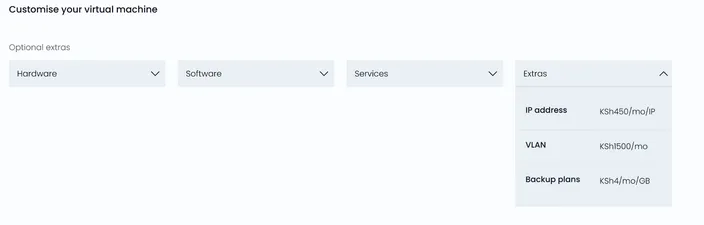
- It doesn't automatically back up your data. HostAfrica offers snapshot backups as an optional add-on.
- It still needs maintenance. Software updates, user accounts and security must be managed.
Understanding these limits helps you plan properly and avoid surprises.
How Do You Move Your Office Server Online?
You don't have to move everything at once. A careful approach reduces the risk of disrupting your business.
Step 1: List what's on your server
Identify your applications, shared files, databases and the employees who use them.
Step 2: Decide what should move
Some systems belong on a Windows VPS, others on Linux hosting or a dedicated hosted service.
Step 3: Choose the right server
Consider your applications, number of users, RAM, storage, and operating system. Larger businesses running several applications may need a multi server setup rather than relying on one VPS. Our guide on choosing the right VPS size can help.
Step 4: Transfer your systems
Work with your IT person or software provider to configure the new server and move your data. If your business currently uses a server farm, you'll need to plan the move carefully. Make sure the different servers and applications can continue working together after the move.
Step 5: Test everything
Let a few employees try the new setup before switching the whole company.
Step 6: Switch at the right time
Avoid month-end, payroll, or important KRA deadlines. Keep the old server available temporarily as a fallback.
How Do You Keep Your Office Files and Data Safe Online?
Moving your server online doesn't automatically make your data secure.
Start with backups. HostAfrica offers snapshot backups as an add-on during VPS configuration. You should also consider separate backups and regularly test whether your data can be restored. For more guidance, read our article on VM snapshot best practices.
Other important precautions include:
- Give each employee a separate login.
- Use strong passwords and multi-factor authentication where supported.
- Limit access to sensitive files and applications.
- Keep software updated and replace unsupported systems.
- Secure remote connections to your server.
For more practical security tips, check out our guide on securing your Windows server.
Hosting in Kenya can help keep your hosted data within the country, depending on your backup and service arrangements. However, businesses still need to consider their responsibilities under Kenya's Data Protection Act.
Is Moving Your Office Server Online Worth It?
An office server might seem cheaper because you've already bought it. But there are ongoing costs to consider.
You still pay for electricity, repairs, maintenance, and eventual hardware replacement. Add generator fuel, UPS batteries, and the hours employees lose during outages.
A VPS replaces some of these expenses with a monthly hosting fee.
| Office server | Server with UPS/Generator | Server online | |
| Survives long office outages | No | While backup power lasts | Yes, at the data centre |
| Remote working | Requires setup | Requires setup | Supported with internet |
| Hardware maintenance | Yes | Yes, plus power equipment | No on-site server |
| Main costs | Power, repairs | Fuel,batteries, servicing | Monthly hosting and related services |
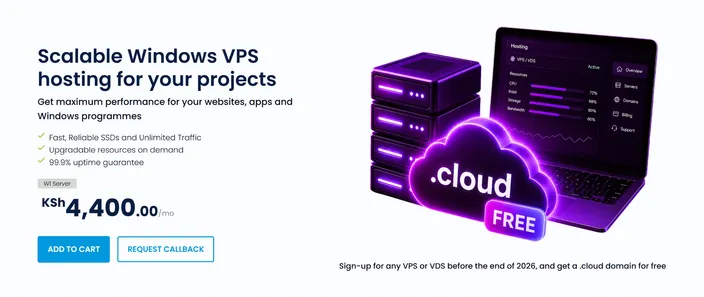
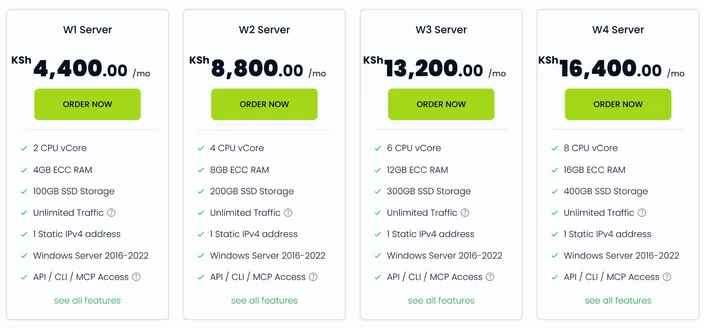
HostAfrica Windows VPS plans start from KSh 4,400 per month, although current pricing should be confirmed before ordering. The total depends on resources, licences, backups and other services.
Kenyan customers can pay in KSh, including through M-Pesa.
Of course, moving online isn't necessary for everyone. If your business has reliable backup power, a modern server, and employees who always work on-site, your current setup may still work well.
But if outages regularly disrupt operations, moving your important systems online could be worth the investment.
Common Mistakes to Avoid
- Moving everything online: Some physical equipment still needs to stay on-site.
- Skipping backups: Online hosting doesn't replace a proper backup plan.
- Ignoring internet access: Employees still need connectivity to work remotely.
- Keeping outdated software: Moving unsupported applications doesn't remove security risks.
- Forgetting licences: Confirm that your software allows hosted use.
- Moving during busy periods: Avoid month-end or important deadlines.
- Sharing logins: Give employees individual accounts.
Frequently Asked Questions: Keep Your Office Server Online
What does moving an office server online mean?
It means running compatible business applications and files on a remotely hosted server instead of a physical machine in your office.
Will my business keep working during a power cut?
Your hosted systems can remain available, but employees need electricity, internet and suitable devices to access them.
Can I move my Windows server to a VPS in Kenya?
Yes, many Windows applications can run on a Windows VPS. Check software compatibility, licensing and server requirements before moving.
What should stay in the office?
Physical equipment such as printers, CCTV recorders, and door access systems generally stay on-site.
How much does hosting an office server online cost in Kenya?
Costs depend on server resources, licences, backups, and support. HostAfrica Windows VPS plans start from around KSh 4,400 monthly, subject to current pricing.
What about my old Exchange or Windows Server 2012 R2?
Review whether the software is supported and consider upgrading or replacing it. A hosted email service may be better for an old Exchange setup.
Conclusion: Keep Your Business Running When the Lights Go Out
Power interruptions are a reality for many Kenyan businesses. But your important systems don't have to shut down every time the office loses electricity.
Moving suitable applications and files online means employees can continue accessing them from wherever they have power and internet.
A VPS won't solve every problem, and not every business needs one. But if outages regularly interrupt your work or your office server is getting old, it's worth considering.
Start by listing everything your current server does then decide what should move online and what should stay.
Ready to keep your business systems running even when the power goes out? Explore HostAfrica's Windows VPS plans and find the right hosting solution for your business.