TL;DR
- VM snapshots are save points that capture your virtual machine’s disk changes (and sometimes memory and CPU state).
- They work by locking the main disk and saving all new changes to a delta disk.
- Snapshots are best for short-term testing, updates, and maintenance.
- They let you quickly roll back if something goes wrong with updates or changes.
- Snapshots are not a replacement for backups—always have a proper backup plan.
- Keeping snapshots too long can cause slower performance, wasted storage, and complicated recovery.
- Snapshots offer limited protection against hardware failure or cyber threats.
- Remove or merge snapshots soon after confirming changes are successful.
- The best approach is to use temporary snapshots together with regular, offsite backups.
What is a VM Snapshot?
A VM snapshot is like a save point for your virtual machine. It captures the disk, memory, and settings at a specific moment.
When you take a snapshot:
- The main disk becomes read-only.
- All new changes are saved to a separate disk (the delta disk).
- You can also save the VM’s memory and CPU state, so you can resume exactly where you left off (depending on your platform).
Snapshots make it easy to roll back to a safe state if something goes wrong.
How Do VM Snapshots Work?
After taking a snapshot:
- The original disk is locked as the base.
- A delta disk is created for all new changes.
- When the VM reads data:
- It checks the delta disk first.
- If the data isn’t there, it reads from the base disk.
As you use the VM, the delta disk grows. When you delete or merge snapshots, changes are written back to the base disk, restoring a single, up-to-date state.
This lets you:
- Test updates safely
- Roll back failed changes quickly
- Avoid mistakes during short maintenance
What is a Delta Disk?
A delta disk is a record of all changes made after a snapshot.
- It tracks every change since the snapshot.
- The original disk stays unchanged until you merge or delete the snapshot.
- Reverting to a snapshot usually means discarding the delta disk and returning to the base disk’s state.
Delta disks are for short-term use. Keeping many snapshots for long periods can:
- Use up storage
- Slow down your VM
- Make backups and recovery harder
When Should You Use VM Snapshots?
Snapshots are most useful when used temporarily and with a plan. Common uses:
- Testing software or settings
- Try a new app or update. If it fails, roll back.
- Applying patches or upgrades
- Take a snapshot before updating your OS or services. Roll back if there’s a problem.
- Short-term safety during maintenance
- Use snapshots as a safety net. Delete or merge them once you’re sure everything works.
Snapshots vs Backups
Both help you recover from problems, but they’re different. Here’s a comparison:
| Aspect | Snapshots | Backups |
| Main use | Short-term rollback, testing | Long-term data protection, recovery |
| Storage location | Same platform and storage as VM | Separate system, often offsite |
| What’s saved | Disk state, config, sometimes memory/CPU | Files, disks, apps, or whole systems |
| Hypervisor dependency | Fully dependent | Independent |
| Hardware failure protection | Limited | Strong |
| Ransomware/corruption protection | Limited | Stronger |
| Retention period | Hours to days | Days to years |
| Performance impact | Can slow down as delta grows | Usually none after backup finishes |
| Storage use | Grows with changes | Managed by backup settings |
| Best for | Updates, testing, config changes | Disaster recovery, compliance, restores |
| Recovery speed | Very fast | Fast to slow, depends on backup type |
| Risks | Performance, storage bloat, complex chains | Data loss if backups are mismanaged |
| Role | Convenience, safety net | Foundation of data protection |
Visual Guide: How Snapshots Work
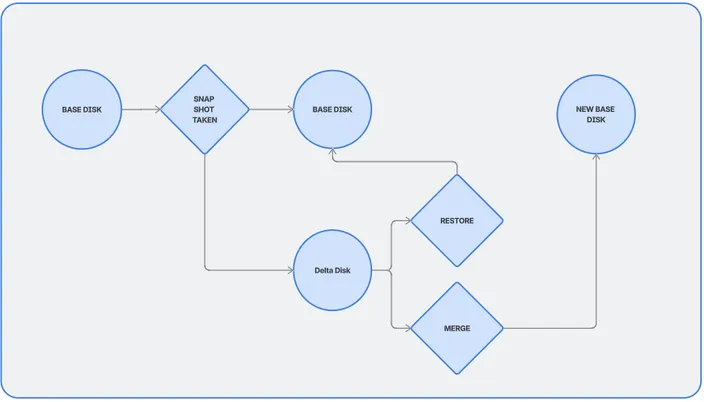
- Base Disk: The VM’s state at the first snapshot.
- Delta Disk(s): Each snapshot adds a new layer of changes.
- Consolidation: Merges changes from delta disks back into the base disk.
Frequently Asked Questions
Are VM snapshots the same as backups?
No. Snapshots are for quick rollbacks, not long-term protection. They live on the same storage as your VM and depend on your platform. If the host fails, you lose the snapshots. Backups are stored separately and protect against hardware failure, cyber threats, and accidental deletion.
How long should I keep a VM snapshot?
Ideally, just a few hours or days. Delete or merge snapshots as soon as you confirm changes are successful. Long-lived snapshots use more storage, slow down your VM, and make recovery harder.
Do VM snapshots affect performance?
Yes, especially if kept for long. As delta disks grow, your VM can slow down. One short-lived snapshot is usually fine, but many or old snapshots can cause problems.
Can I use snapshots to protect against ransomware?
Not reliably. Snapshots are on the same storage, so ransomware or corruption can affect them too. Only offsite, unchangeable backups provide strong protection.
What happens when I delete a snapshot?
Deleting a snapshot does not delete your VM’s current state. Instead, changes from the delta disk are merged back into the base disk, giving you a single, up-to-date disk.
Is it safe to take snapshots on production VMs?
Yes, if you’re careful. Snapshots are common before updates or changes. Keep them short-lived, avoid long chains, and monitor storage and performance.
How many snapshots can I take per VM?
Most platforms allow several, but it’s not recommended to keep many. Multiple snapshots create deep chains, which can slow down your VM and cause issues. Best practice: one snapshot at a time, removed quickly.
Should I shut down the VM before taking a snapshot?
Not always. Many platforms support live snapshots. Snapshots with memory let you roll back instantly. For important workloads, use application-consistent snapshots and always combine with backups.
What’s the best strategy for using snapshots?
- Use snapshots before risky or planned changes
- Keep them short-lived
- Merge or delete them regularly
- Never rely on snapshots alone
- Always pair with scheduled, offsite backups
Conclusion: Building a Safer VM Strategy in Kenya
Used wisely, VM snapshots are powerful for testing and quick rollbacks. But they’re not a substitute for a solid backup plan.
To get the most from snapshots:
- Use them before risky changes
- Keep them short and merge them soon
- Combine with regular, offsite backups for real protection
By using snapshots and backups together, you can move faster, test confidently, and protect your virtual machines from mistakes and unexpected problems.
Kenyan Hosting Options with Snapshots
Snapshots are available with any of our HostAfrica Kenya virtual machine services:
If you're unsure if you're ready to upgrade to a virtual machine or not, check out this blog post.