It’s the afternoon before a KRA filing deadline. Your accountant is finalising the figures when the power goes out. Ten minutes later, the UPS gives up too. Suddenly, nobody can access the books.
The problem isn’t your accounting software. It’s where it lives.
For many Kenyan businesses, software like QuickBooks Desktop, Sage, or Tally runs on an office computer. When that computer goes down, access to financial records goes with it.
A Windows VPS for accounting software offers a practical alternative. You keep your familiar software and workflows, but run them on a remote server that doesn’t depend on your office’s power supply.
Key Takeaways
- Office-based accounting software can be disrupted by power outages, hardware failures, or limited remote access.
- A Windows VPS lets businesses run familiar accounting software on a remote server, accessible over the internet.
- Unlike switching to cloud accounting software, a VPS lets you keep your existing system, where compatible.
- Before moving, check software licensing, user requirements, server resources, and backups.
- Hosting in Kenya offers local infrastructure, KSh billing, and local support.
Why Office-Bound Accounting Software Can Become a Business Risk
Picture a hardware supplier in Industrial Area. Three employees rely on accounting software running on one office computer.
It works until there’s a power outage, hardware failure, or even a spilled cup of chai. Suddenly, nobody can access the books.
What if the owner needs to check figures while travelling to Mombasa or an accountant needs to work from home? Relying on one computer limits flexibility and creates unnecessary risk.
UPS systems, generators, and backups can help, but moving the software to a remote server offers greater flexibility.
Your Options: Keep It in the Office or Move It to a Windows VPS
You don’t automatically need a VPS. There are three realistic options, and each one makes sense for a different type of business.
| Office PC/Server | Cloud Accounting Software | Windows VPS | |
| Works during office power cuts | No | Yes | Yes |
| Access from outside the office | Limited | Yes | Yes |
| Keep your current software | Yes | No | Yes |
| Physical hardware to maintain | Yes | No | No |
| Remote Working | More difficult | Easier | Easier |
| Best for | Businesses that mainly work from one location and are comfortable maintaining their own hardware | Businesses ready to change systems | Businesses that want to keep their existing software while reducing their dependence on the office |
- Staying on the office PC: Involves the least change. If only one person uses the software and remote access isn’t important, there may be little reason to move.
- Switching to cloud accounting software: Is another option. Platforms like QuickBooks Online, Xero offer online access, but switching may involve migrating data, retraining employees, and adjusting familiar workflows.
- Moving your existing software to a Windows VPS: Offers a middle ground. Instead of changing your accounting system, you simply change where it runs.
If you’re unfamiliar with VPS hosting, our guide to VPS servers and how they work explains the basics.
For businesses happy with their current software, a Windows VPS can provide more flexibility without starting from scratch.
What Is a Windows VPS?
Imagine the Windows computer in your accounts office. Now imagine that same computer running in a professional data centre instead of under someone’s desk. That’s essentially what a Windows VPS is.
It’s a virtual Windows computer with its own processing power, memory, and storage that you access over the internet. You can install compatible accounting software and store your company files there.
For a more technical explanation, see our guide on Windows vs Linux VPS hosting.
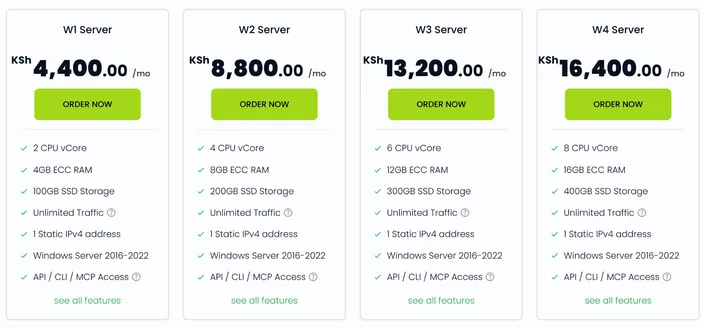
For Kenyan businesses, HostAfrica offers Windows VPS hosting with Kenya as an available server location. Plans currently start from KSh 4,400 per month.
How Does It Work Day to Day?
Using accounting software on a Windows VPS is similar to using it on your office computer. Here’s how it works:
Connect Through Remote Desktop
Your accountant logs into the Windows VPS using Remote Desktop and sees a familiar Windows desktop.
Open Your Accounting Software
They open QuickBooks Desktop, Sage, or another compatible application and work as usual. The software and files run on the VPS instead of the office PC.
Access Your Books From Anywhere
Authorised employees can access accounting software remotely from home, another branch, or while travelling. Multiple users can connect if the server and licensing allow it.
Work During Power Outages
If the office loses power, the VPS stays online. Employees with electricity and internet access elsewhere can continue working.
You’ll Still Need Internet
A Windows VPS removes dependence on your office computer, but you’ll still need an internet connection to access it.
What Should You Check Before Moving?
Before moving your accounting software to a Windows VPS, here are a few things to consider:
- Check Your Software Licence: Confirm with your software vendor whether your QuickBooks, Sage, Tally, or other accounting software licence allows hosting on a remote server.
- Count Your Users: How many employees need access at the same time? Multiple users may require additional Windows Remote Desktop licensing.
- Choose the Right Server Resources: Your VPS needs enough RAM, storage, and processing power to run your software smoothly. Our guide on choosing the right VPS size can help you understand what you need.
- Check Your Internet Connection: Make sure employees have a stable internet connection wherever they’ll be working.
- Plan the Migration: Decide who will handle the move. Your hosting provider can assist with the server setup, while your accounting software specialist can help migrate the application and data.
Keeping Your Accounting Data Safe
Here’s what to consider:
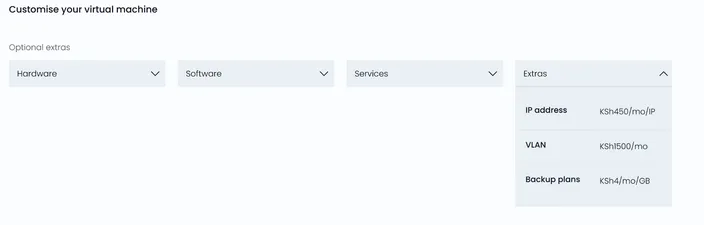
- Set Up Regular Backups: Windows VPS backups aren’t included by default. Snapshot backups are available as an add-on and are worth considering when storing important financial records. Read our guide on VM snapshot best practices to learn more.
- Secure Employee Access: Give employees individual login details, use strong passwords, restrict access to authorised users, and keep Windows updated. Our guide to securing your Windows server covers more security tips.
- Consider Data Location: HostAfrica offers Kenya as a server location, which may suit businesses that prefer local data hosting. If your business has specific obligations under Kenya’s Data Protection Act, confirm that your setup meets those requirements.
Making the Move
Moving your accounting software doesn’t have to be complicated. Here’s how to approach it:
Choose Your Windows VPS
Select a plan with enough resources for your software and users. Choose Kenya as your server location if needed, and add a backup option.
Install and Transfer Your Software
Have your IT team or software reseller install the accounting application and transfer your company files to the VPS.
Test Before Going Live
Start with one or two users. Check that they can log in, access the correct files, run reports, and print or export documents.
Move the Rest of Your Team
Once everything works, give the remaining employees access. Avoid migrating just before month-end or a KRA deadline.
HostAfrica provides year-round technical support for server-related issues. For accounting software problems, contact your software vendor or reseller.
Common Mistakes to Avoid
When moving your accounting software to a Windows VPS, avoid these common mistakes:
- Skipping backups: Hosting on a VPS doesn’t eliminate the need for regular backups.
- Ignoring software licensing: Confirm that your accounting software licence allows hosted use.
- Choosing the wrong VPS plan: Make sure the server can support your software and the number of users.
- Sharing login details: Give each employee their own account for better security and access control.
- Overlooking internet reliability: A VPS still requires a stable internet connection.
- Rushing the migration: Test everything before making the new setup business-critical.
Is It Worth It for Your Business?
HostAfrica’s Windows VPS plans start from KSh 4,400 per month. But consider what your current setup costs in UPS batteries, generator fuel, hardware maintenance, and lost productivity when systems go down.
For a business with one accountant working from the office, the existing setup may be enough. But for accounting firms, businesses with multiple branches, or teams needing remote access, a cloud server for accounting software could be a worthwhile investment.
Customers can also pay in KSh through local options like M-Pesa, making budgeting easier. Ultimately, not every business needs a Windows VPS, but your accounting records shouldn’t have to depend on one office computer.
Frequently Asked Questions
Can I run QuickBooks Desktop or Sage on a VPS in Kenya?
Yes, if your software and licence support Windows Server hosting. Confirm compatibility with your software vendor before moving.
What’s the difference between a Windows VPS and cloud accounting software?
Cloud accounting uses online platforms like Xero or QuickBooks Online. A Windows VPS lets you keep your existing compatible software but run it remotely.
Will my accounting software still work if the office has no power?
Yes. The VPS runs independently of your office, so you can continue working from anywhere with power and internet access.
How much does a Windows VPS cost in Kenya?
HostAfrica’s Windows VPS plans start from KSh 4,400 per month, depending on your chosen resources and add-ons. Check current pricing before ordering.
Is my financial data safe on a VPS?
A VPS can be secure with strong passwords, regular updates, controlled access, and backups. HostAfrica’s snapshot backups are available as an add-on.
Can I pay for a Windows VPS with M-Pesa?
Yes. HostAfrica supports M-Pesa payments in Kenya, with plans priced in KSh.
Keep Your Accounting System Running Beyond the Office
If your accounting software already meets your business needs, you may not need to replace it. The problem could simply be where it lives.
Moving compatible accounting software lets your team keep familiar tools while accessing company records remotely.
It won’t suit every business, but if power outages, limited access, or ageing hardware regularly disrupt your work, it’s worth considering. Start by comparing HostAfrica’s Windows VPS plans in Kenya, confirm compatibility with your software provider, and remember to plan your migration and backups.