
"I want to automate my social media posting" Just use n8n.
"I want a pipeline that takes a YouTube idea and turns it into a publish-ready video in one click." Use n8n.
"I want a Slack notification every time someone fills out my contact form." n8n can do that too.
n8n is supposedly the automation tool that can bring any of your ideas to life. People keep telling you it's free, open-source, powerful, and beginner-friendly enough for anyone to pick up.
But then you visit the website, and here's what you actually see:
- The Starter plan costs $24 per month.
- There's a free version you can download from GitHub... but you need to host it yourself.
- The free self-hosted version has no execution limits, but the paid cloud plans do. If the free version does more, why would anyone pay?
At this point, most people close the tab. And honestly, that's fair. It's not immediately clear what n8n actually is or what any of this means for your situation.
That's exactly what we're here to fix. In this guide, we will cover everything you need to know about n8n, how it works, how free the self-hosted option really is, and whether beginners can realistically leverage it on their own.
What is n8n, Really?
n8n is a workflow automation platform. It lets you connect different apps and services, define a sequence of steps, and run that sequence automatically whenever something happens.
Think of it this way: imagine you have a set of digital tools, such as Gmail, Slack, Google Sheets, your CRM, and a dozen others. Each one does its own job, but to make them work together and automate parts of your daily routine, you need something to coordinate the process.
In many modern workflows, n8n plays that coordinating role. It watches for the right signal, decides what needs to happen next, and tells each tool when to act, in what order, and with what data.
So instead of manually copying a form submission into your CRM, then emailing the lead, then posting a Slack update to your team, you set up a workflow in n8n and it automatically handles all three steps for you.
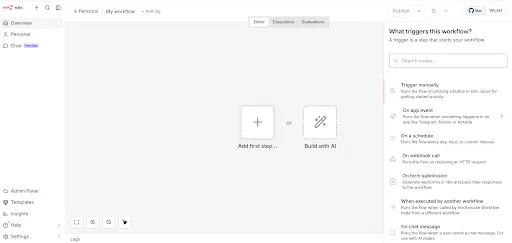
The platform has a visual, drag-and-drop builder where you connect these steps as a flowchart on a canvas. You don't have to write code to use it, though you can if you need custom logic. That's what makes it flexible enough for both non-technical users and developers.
- The Evolution of n8n
When Jan Oberhauser launched n8n on GitHub in 2019, it was a practical, self-hostable alternative to Zapier. Cheaper at scale and open enough to run on your own infrastructure.
That core is still there. But n8n has grown into something much bigger. The platform raised $180 million in a Series C round in late 2025, reaching a $2.5 billion valuation.
By May 2026, SAP invested at a $5.2 billion valuation and agreed to embed n8n natively within its enterprise software environment.
What drove that growth? AI.
n8n has repositioned itself as an AI agent orchestration platform. It now supports multi-step AI agent systems where an AI model doesn't just generate text. It reasons about a problem, decides which tools to call, calls them, and adapts based on the results.
n8n provides the infrastructure to build and chain those systems together, with visual workflows, 1,900+ integrations, and native LangChain support powering the whole thing.
If the 2019 version was "automated pipelines,", it’d be fair to call the modern version "automated pipelines where individual steps can be AI agents making decisions."
How Does n8n Work?
At its core, n8n is built on a handful of simple concepts. Let's go through each one.
- Workflows
A workflow is the automation you build. Visually, it looks like a flowchart: a series of boxes connected by arrows, where each box is one step and the arrows show how data moves between them.
You build workflows in n8n's visual canvas. You can trigger a workflow manually, run it on a schedule, or have it fire automatically in response to an event, like a new form submission.
- Nodes
- Nodes are the individual steps inside a workflow. Every box on the canvas is a node. Here are some things you can do with nodes:
- 1. Start the workflow when something happens, like a new row in Google Sheets or an incoming webhook.
- 2. Fetch or send data to external apps, like pulling records from your CRM or posting a message to Slack.
- 3. Transform data as it moves through the workflow, filtering, formatting, mapping fields, or merging results from multiple sources.
- 4. Control the flow by branching the workflow based on conditions, so different paths run depending on what the data looks like.
- 5. Write custom logic in JavaScript or Python when the built-in options don't cover what you need.
- n8n comes with over 1,900 built-in nodes covering the apps and services most teams already use. If a native node doesn't exist for something, the HTTP Request node lets you connect to any REST API yourself.
Credentials
When n8n connects to an external app, it needs your authentication details, like an API key or OAuth token. These are stored as Credentials in n8n, encrypted and kept completely separate from the workflow itself.
- Executions
An execution is one complete run of your workflow from start to finish. Whether your workflow has 2 steps or 25 steps, it counts as exactly one execution.
This distinction matters a lot for pricing. Zapier charges per "task," where every individual step costs one task. n8n charges per execution, so a 25-step workflow costs the same as a 2-step one. For anyone building complex automations, that's a significant difference in what you'll pay each month.
What Do People Build with n8n?
n8n is used across a wide range of industries and personal projects. Here's a look at what people actually build with it:
- Social media cross-posting: Automatically push new content to Instagram, LinkedIn, Twitter, TikTok, Threads, and YouTube Shorts from a single source.
- AI-powered video pipelines: Accept a video topic, pass it to an AI model for scripting, generate a voiceover, create a thumbnail, and push everything to YouTube, mostly hands-free.
- Lead management and CRM sync: Score and qualify new leads from web forms automatically, create CRM records, trigger personalised follow-up emails, and notify your sales team on Slack, all within seconds of a submission.
- E-commerce order processing: Sync inventory across platforms, send order confirmation emails, trigger shipment tracking notifications, and update your dashboard automatically after every new order.
- IT operations at scale: Delivery Hero, the global food delivery platform, built a single n8n workflow that saved their IT operations team over 200 hours per month.
- Customer support routing: Route incoming tickets based on priority or category, assign them to the right team member, and send auto-responses for common questions.
- Internal AI agents: Build agents that reason about a task, pull context from a database, decide what steps to take, and report results. This is n8n's fastest-growing use case right now.
Self-Hosted vs. Cloud n8n
There are two ways to run n8n. Let's break them down clearly.
- Self-Hosted n8n
The self-hosted version of n8n is open-source. You download it from GitHub, deploy it on a server you control, and run it yourself.
But here's something important to understand from the start: even if you self-host n8n, it won't be free for you. The software is indeed free. Running it is not.
You need a server to host it on. A basic VPS will cost you anywhere from $8 to $20 per month depending on the specs. Once you purchase the VPS, you'll need to set up Docker (the technology used to run n8n), configure a PostgreSQL database to store your workflows and execution history, and set up SSL so your n8n instance has a secure HTTPS address.
If you’d rather not do all that manual configuration, there’s also the option of a pre-configured n8n hosting, like the one offered by HostAfrica. This type of hosting comes with n8n already running in Docker, so there's no manual setup, and you can get straight to building.
The payoff of self-hosted n8n is significant. Once you're set up, you get unlimited workflows and unlimited executions with no monthly caps. You're only limited by your server's capacity.
- Cloud n8n
n8n Cloud is the managed, hosted version. You sign up, n8n handles everything behind the scenes, and you get a ready-to-use instance within minutes.
Here's what the current cloud plans look like:
| Plan | Cost per month | Executions per month |
|---|---|---|
| Starter | $24 | 2,500 |
| Pro | $60 | 10,000 |
| Business | $960 | 40,000 |
| Enterprise | Custom | Custom |
A few things worth knowing. All plans include unlimited active workflows and unlimited users, so your entire team can collaborate without extra per-seat charges. You're only billed based on how many times your automations run each month.
The Starter plan's 2,500 monthly executions is more than enough for most beginners. If you're running a handful of automations that each trigger several times a day, you'll stay well within that ceiling.
Is n8n Right for You?
n8n is a genuinely powerful tool, but "powerful" doesn't mean it's the right fit for everyone. Here's a practical way to think about it.
n8n is a great fit if...
- You want to build AI-powered workflows. n8n's native support for OpenAI, Anthropic, Google Gemini, and LangChain makes it one of the strongest platforms for building AI agent pipelines right now.
- You're comfortable with a bit of a learning curve. n8n's visual builder is intuitive once you get the hang of it, but you can still expect to spend a few hours learning the basics before things click.
- You want to build complex, multi-step automations. Because n8n charges per execution rather than per step, it's dramatically cheaper than competitors when your workflows have a lot of moving parts. The more complex your automations, the more it works in your favour.
- You have developer instincts, even if you're not a full developer. You don't need to write code, but if you're comfortable with things like APIs, JSON, and basic logic, you'll get a lot more out of n8n than someone who isn't.
n8n might not be the right choice if...
- You need the simplest possible setup with zero learning involved. If you need a two-step automation running in 10 minutes with no prior knowledge, you’d likely find Zapier to be easier.
- You need a very specific app integration that n8n doesn't natively support. n8n has 1,900+ native integrations, and its HTTP Request node covers a lot of the gaps, but Zapier's 9,000+ integrations mean it's more likely to have a turnkey connector for niche tools.
- You're a complete non-technical user building simple automations. If your workflows are two or three steps, you're not using n8n's strengths, and Zapier will get you there faster with less friction.
FAQs
Finally, here are some commonly asked questions about n8n.
Is n8n actually free?
No. The Community Edition (self-hosted) is free software, but you still need to pay for a server to run it on, typically $8 to $20 per month. n8n Cloud starts at $24 per month. There's a 14-day free trial for the cloud version with no credit card needed, which is the easiest way to try n8n without spending anything.
Do I need to know how to code to use n8n?
Not for most use cases. The majority of workflows can be built entirely through n8n's visual drag-and-drop editor without writing a single line of code. A basic familiarity with APIs and JSON will help you go further. Code nodes in JavaScript and Python are available for anything custom, but they're optional, not required.
How does n8n compare to Zapier?
The biggest difference is how they charge. Zapier charges per task, where every step in a workflow costs one task. n8n charges per execution, where an entire workflow run costs one execution regardless of how many steps it has. Zapier supports 8,000+ integrations and is easier for complete beginners. n8n has 1,900+ native integrations but connects to almost anything via its HTTP Request node.
How many executions do I actually need?
It depends on how many workflows you run and how often they trigger. A simple notification workflow might fire 50 times a month. A high-volume e-commerce automation might run thousands of times a day.
Can n8n handle AI workflows?
Yes, and it's one of n8n's strongest features right now. n8n natively supports OpenAI, Anthropic Claude, Google Gemini, and other AI models, and integrates with LangChain for building full AI agents. You can build workflows where an AI model reasons about a task, decides which tools to use, and takes multi-step actions automatically.
Conclusion
n8n is one of the most capable and flexible automation platforms available today. Whether you want to eliminate repetitive manual work, connect your tools in ways not natively supported, or build sophisticated AI agent pipelines, it has the building blocks to make it happen.
The pricing and setup options are a little more layered than most tools at first glance, but the logic behind them is straightforward once you understand what an execution means and the difference between self-hosted and cloud.
If you're ready to start, the 14-day cloud trial is the easiest way in. And when you're ready to self-host for full control and unlimited executions, HostAfrica's pre-configured n8n VPS gets you there without the setup headache.
