Scammers sometimes send emails that look like they come from HostAfrica. They copy the logo, use the name "HostAfrica support" and warn that your domain is about to expire. The aim is to get you to click a payment link and type your card details into a page they control.
Whatever the email says, the safe response is the same: ignore the link, log in to your HostAfrica account yourself and check there.
How HostAfrica Contacts You About Billing
Real HostAfrica email comes from an address that ends in @hostafrica.com. The support address is support@hostafrica.com.
Your invoices live in the HostAfrica client portal at panel.hostafrica.com. You can see what you owe, when it is due and pay it there.
HostAfrica never sends direct payment links. If an email gives you a link to pay, treat it as fake, even if everything else about it looks right. To pay an invoice, open your browser, type the portal address yourself or use a bookmark you saved, log in and pay from your account.
Warning Signs of a Fake HostAfrica Email
One of these on its own is a reason to stop and check. A scam email usually shows several.
The sender address is not @hostafrica.com
Look at the full address, not only the name shown next to it. Scammers put "HostAfrica" in the display name and send from an unrelated domain, or from a look-alike such as a domain with "hostafrica" plus an extra word.
It asks you to pay through a link
A button or link that says "pay now", "renew now" or "pay your bill directly" is the clearest sign. HostAfrica does not send these.
It sets a deadline and a threat
Fake emails try to rush you. Typical lines are "your domain has expired", "your mailboxes will be deactivated" or "final warning: your website will go offline". Panic is what the scammer wants, because people who panic skip the checks.
The link text and the link address differ
The words in an email can show one address while the link takes you somewhere else. Hover over a link on a computer, or press and hold it on a phone, to see where it really goes. If it does not lead to panel.hostafrica.com, do not open it.
The payment page asks for your card details on another site
A fake email often leads to a copy of a well-known payment provider's page. The page looks real, but the web address in your browser bar is not the provider's own.
It asks for a password or a one-time code
No genuine invoice needs you to send your password, a login code or your full card number by email.
For phishing in general, including scams that pretend to be banks or tax offices, read our email phishing safety guide.
An Example: The Fake Payment Page Scam
HostAfrica has warned clients about a phishing campaign that used most of the tricks above.
The email arrived with the subject line "Your domain name has expired". The sender name read "HostAfrica support" and the HostAfrica logo sat at the top, but the actual sender address was on a domain that had nothing to do with HostAfrica. The message gave the recipient's own domain name and an expiry date, which made it look personal and urgent.
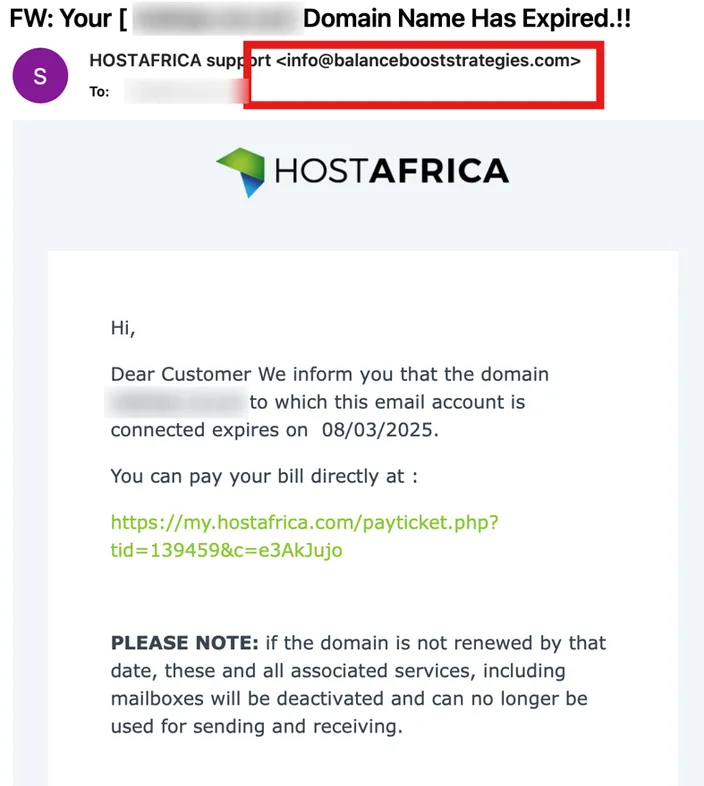
It then told the reader to "pay your bill directly" through a link. The visible link text looked like a HostAfrica address. Clicking it opened a copy of the PayFast payment page, built to collect card details. Anyone who entered their card there handed the details to the scammers.
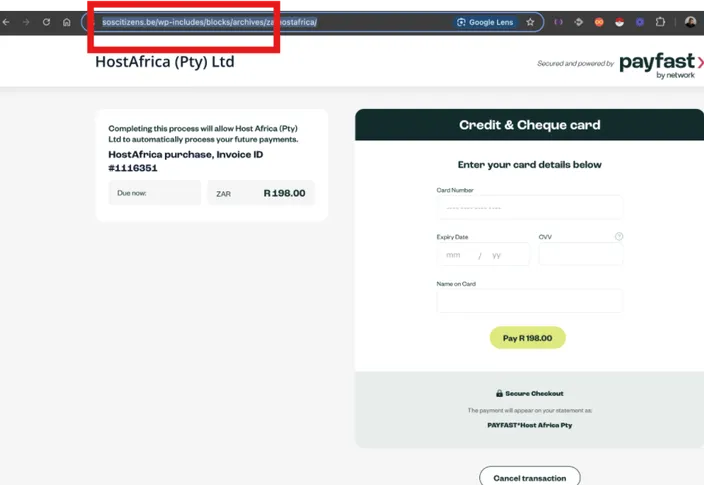
A reader who ignored the link and logged in to the client portal would have found no such invoice. When a domain really is due for renewal, the invoice is waiting in the account.
How to Report a Fake HostAfrica Email
If you get an email that claims to be from HostAfrica and you are not sure it is real:
- Do not click any link or open any attachment in it.
- Do not reply to it or enter any payment details.
- Forward it to support@hostafrica.com. If your email program lets you forward it as an attachment, do that, because that keeps the original sender details.
- Delete the email once you have reported it.
If you just want to know whether an invoice is genuine, log in to the client portal and compare. A real invoice will be in your account.
What to Do if You Already Clicked or Paid
Act quickly, and work through what applies to you.
- If you entered card details, call your bank or card issuer straight away. Tell them you entered your card on a fraudulent page, and ask them to block the card and check recent transactions.
- If you typed in a password, change it at once. Start with your HostAfrica client portal password, then change it on any other account where you used the same one.
- Turn on two-factor authentication for your client portal login if you have not already, so a stolen password alone is not enough to get in.
- Contact HostAfrica support at support@hostafrica.com or by opening a ticket. Tell them what happened, when, and what details you entered, so they can check your account.
- If you opened an attachment, run a full scan with up-to-date security software on that device.
Keep the scam email and any confirmation messages. Your bank may ask for them.
Frequently Asked Questions
Is HostAfrica legit?
Yes. HostAfrica is the trading name of HOSTAFRICA EAC LIMITED, a Kenyan company with registration number C.119340. It is part of the HostAfrica group, which started in Cape Town in 2008 and has offices in South Africa, Kenya, Nigeria, Ghana and Tanzania. You can read more on our about us page. Scammers copy well-known brands because people trust them, so a fake email using the HostAfrica name says nothing about HostAfrica itself.
Which email address does HostAfrica use?
Real HostAfrica email comes from an @hostafrica.com address. For help, write to support@hostafrica.com. Even when the address looks right, pay invoices only after you log in to the client portal yourself.
What is the HostAfrica contact number?
HostAfrica does not run a telephone support line. Support is available 24/7 by ticket, with live chat during business hours. You will find the ticket links for sales, support, billing and abuse on the contact us page. If someone phones you claiming to be from HostAfrica and asks for payment or your password, do not give it. Log in to the client portal or open a ticket instead.
Does HostAfrica send payment links by email?
No. HostAfrica never sends direct payment links. Log in to panel.hostafrica.com to see and pay your invoices.
Does HostAfrica have a bug bounty programme?
Yes. The Vulnerability Disclosure Policy and Bug Bounty Programme explains what is in scope, how to report a security weakness in HostAfrica's own systems and how rewards work. Security reports go to security@hostafrica.com. A phishing email that pretends to be HostAfrica is not a vulnerability report, so forward those to support@hostafrica.com.