You've spent weeks preparing for your online shop's biggest sale. You've paid for Instagram ads, partnered with an influencer, and promoted your offers.
Finally, payday weekend arrives.
Customers start visiting your website, but within minutes, it slows down. Some can't add products to their carts, while others see error pages instead of your offers.
Your website crashed when you needed it most.
For Kenyan businesses, this means lost sales, wasted advertising money, and frustrated customers.
The good news? Most website crashes during high traffic can be prevented.
In this article, we'll explain why websites crash during busy sales periods. We'll also look at how to prevent crashes and when it makes sense to upgrade your hosting.
Key Takeaways: Why Websites Crash
- Websites crash during high traffic when demand exceeds available server resources.
- Common causes include hosting limits, heavy plugins, slow checkout pages, and unwanted traffic.
- A crash can cost you sales, advertising money, and customer trust.
- Caching, website optimisation, and testing can help prevent website crashes.
- Cart and checkout pages need enough server capacity, especially during busy sales.
- Always have a backup plan, such as WhatsApp ordering, if your website goes down.
Why Does a Website Crash During High Traffic?
Every website runs on a server. Think of it like a busy supermarket in Nairobi.
On a normal day, customers shop and pay without problems. But imagine hundreds of customers arriving at once, with only two cashiers available. Queues grow, service slows down, and some customers eventually leave.
Websites work the same way.
Your hosting server has limited resources, including processing power (CPU) and memory (RAM). When traffic increases suddenly, pages may load slowly, display errors, or stop responding altogether.
Common causes of website crashes include:
- Shared hosting limits: Your website shares server resources with other websites. Sudden traffic spikes can push your account beyond its limits.
- Lack of caching: Without caching, your server works harder to load pages for every visitor.
- Heavy plugins and images: Too many plugins, large images, and unnecessary scripts can slow down your website.
- Busy checkout pages: Processing multiple carts, orders, and payments at once puts extra pressure on your server.
- Bots and cyberattacks: Automated traffic and malicious requests can overwhelm your server.
Sometimes, your website may display a resource-limit error instead of going completely offline.
Our guide on Resource Limit Is Reached: What It Means and How to Fix It explains what causes this error and how to resolve it.
What Does a Website Crash Really Cost Your Business?
Imagine spending KSh 20,000 promoting a weekend sale. Your ads attract hundreds of visitors, but your website keeps crashing.
You're paying for clicks, yet customers can't complete their purchases.
The impact goes beyond lost sales:
- Wasted advertising budget: Visitors click your ads but land on error pages.
- Abandoned carts: Slow checkouts and payment errors drive customers away.
- Poor user experience: Slow pages frustrate shoppers, especially on mobile.
- Lost customer trust: First-time visitors may hesitate to return.
By the time your website is back online, some customers may have moved to competitors.
Preparing your website is just as important as planning your promotion.
Is It Real Traffic or a DDoS Attack?
Not every traffic spike comes from genuine customers. Sometimes, bots or cyberattacks overwhelm your server with requests.
A DDoS attack (Distributed Denial of Service) floods a website with traffic, making it unavailable to real visitors.
Here's how to spot unusual traffic:
- Genuine traffic: Visitor numbers increase after an advert or promotion, alongside more enquiries or orders.
- Suspicious traffic: Visitors suddenly arrive from unexpected locations without an active campaign.
- Unusual activity: Traffic increases sharply without more sales, sign-ups, or customer interactions.
These signs don't always mean you're under attack. Ask your hosting provider to investigate.
DDoS protection and server monitoring can help keep your website available during unwanted traffic spikes.
How to Prevent Website Crashes: Your Campaign Preparation Checklist
You don't need to be a technical expert to prepare your website for high traffic. You just need to know what to check and when to ask for help.
Use this checklist before your next payday promotion, product launch, or seasonal sale.
Two Weeks Before: Check Your Website's Capacity
- Review hosting resources: Check CPU, memory, and resource-limit warnings in DirectAdmin or cPanel. Repeated issues may mean your website needs optimisation or more resources.
- Enable caching: Caching reduces server workload by serving saved versions of pages. A Content Delivery Network (CDN) can also help improve loading speeds.
- Optimise images and plugins: Compress large images, remove unused plugins, and reduce unnecessary scripts.
- Contact your hosting provider: Explain your expected traffic increase and ask whether your current plan can handle it.
One Week Before: Test Your Website
- Test checkout: Browse products, add items to your cart, and complete a test purchase. Check M-Pesa and card payments on both desktop and mobile.
- Run load tests: Simulate multiple visitors to identify performance issues. Always get your hosting provider's approval before testing.
- Set up monitoring: Use uptime monitoring tools to receive alerts when your website goes offline.
- Prepare alternative ordering: Have a WhatsApp Business contact or another ordering channel ready if your website fails.
The Day Before: Make Final Checks
- Back up your website: Save your website files and database, and make sure the backup can be restored.
- Avoid major changes: Don't install new plugins, change themes, or make unnecessary updates just before launching.
- Confirm support contacts: Keep your hosting provider's and developer's contact details accessible.
- Spread promotional messages: Send emails and SMS messages in batches to avoid overwhelming your website at once.
Launch Day: Monitor Your Website
- Watch performance: Check loading speeds, checkout errors, and resource usage throughout the campaign.
- Monitor orders and payments: Confirm that customers can complete purchases and receive payment confirmations.
- Use your backup plan: If your website crashes, contact support and direct customers to your alternative ordering channel.
A little preparation can help prevent website crashes, protect your advertising budget, and keep customers shopping.
During Your Campaign: Monitor Traffic and Have a Backup Plan
Once your campaign goes live, monitor your website closely, especially during the first few hours.
Check loading speeds, checkout performance, and payments. You can also stagger influencer posts, emails, and SMS messages to avoid sudden traffic spikes.
If your website crashes, contact your hosting provider or developer immediately. Meanwhile, direct customers to an alternative ordering channel, such as WhatsApp Business.
For example, your website could display:
"Our website is temporarily unavailable due to high demand. You can still place your order through WhatsApp."
Include your contact details and clear ordering instructions. For M-Pesa payments, use verified business details and confirm payments before processing orders.
The goal is to keep customers informed and give them another way to buy.
After the Campaign: Learn From Your Traffic Spike
Once the sale ends, review what happened.
Check your website traffic, resource usage, load times, and completed orders.
Did the website slow down at particular times? Were customers abandoning checkout? Did your hosting reach its limits?
Discuss any problems with your developer or hosting provider.
Use those findings to improve your website before the next promotion.
Even a successful campaign can reveal areas worth improving.
When Is Your Hosting the Reason Your Website Keeps Crashing?
Caching and website optimisation can often solve performance problems. However, sometimes your website simply needs a better hosting plan.
Here are three signs you might need an upgrade:
- Your website repeatedly reaches resource limits during traffic spikes.
- Checkout remains slow even after optimising images, plugins, and caching.
- Your online shop regularly attracts more visitors than your hosting can handle.
Checkout pages need more resources because each customer has a separate cart, order, and payment session. Unlike product pages, they can't be fully cached.
If your website needs more capacity, consider these options:
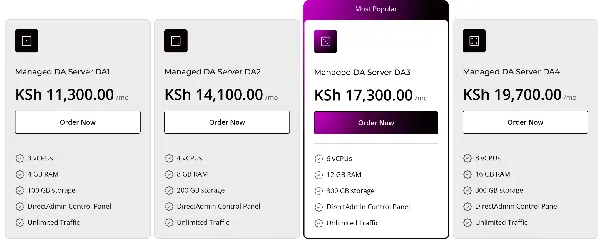
- Managed VPS: HostAfrica's Managed VPS plans start from KSh 11,300/month. They offer dedicated resources, DDoS protection, monitoring, and daily backups. They're ideal for growing businesses that don't want to manage servers themselves.
- Self-managed Linux VPS: Linux VPS plans start from KSh 960/month. They're better suited to developers or businesses with technical teams that can handle server management and security.
- Upgrade your existing VPS: Already using a VPS? Ask your provider whether you can increase RAM or CPU resources before your next campaign.
Not sure which option suits you? Read our Managed vs Unmanaged VPS guide or explore What Size VPS Do I Need?.
A bigger server won't fix a poorly optimised website. For smaller shops, caching, a CDN, or LiteSpeed Hosting may be enough to improve performance.
Start with website optimisation and upgrade when your hosting resources can no longer meet demand.
Common Mistakes That Can Cause Website Crashes During Sales
Even a well-planned promotion can run into problems.
Avoid these common mistakes:
- Launching ads without testing checkout: Customers may reach your website but fail to complete purchases.
- Sending every promotion simultaneously: A sudden flood of visitors can overwhelm limited hosting resources.
- Installing plugins on launch day: Untested changes can break important website features.
- Assuming bigger hosting solves everything: Caching and optimisation still matter.
- Running load tests without permission: Always confirm your hosting provider's testing rules.
- Having no backup plan: Prepare another ordering channel before your campaign begins.
FAQs: Prevent Website Crashes
Why do websites crash during high traffic?
Websites crash when incoming requests exceed the resources available to handle them. Shared hosting limits, inefficient plugins, slow databases, and unwanted traffic can contribute to the problem.
How can I prevent my website from crashing during a sale?
Enable caching, optimise images, test your checkout, monitor resource usage, and speak to your hosting provider before launching. Prepare a fallback ordering option as well.
How do I know if it's real traffic or a DDoS attack?
Compare the traffic spike with your campaign activity. Genuine visitors often generate product views, enquiries, and orders. Unusual traffic without matching customer activity could indicate bots or an attack. Your hosting provider can investigate further.
Can shared hosting handle traffic from a big sale?
Yes, depending on your hosting limits, website optimisation, and number of simultaneous visitors. However, larger online shops may need dedicated resources when shared hosting becomes insufficient.
Do I need a VPS for a high traffic event?
Not always. Start with caching, optimisation, and testing. Consider a VPS when your website repeatedly hits hosting limits or checkout remains slow during busy periods.
What should I do if my website crashes during a sale?
Contact your hosting provider, investigate the problem, and keep customers informed. Use your prepared WhatsApp ordering channel or fallback page while the website is being restored.
Make Your Next Big Sale Your Website's Best Day
A successful promotion shouldn't end with frustrated customers staring at error pages.
Most website crashes during high traffic events can be avoided through preparation.
Start early:
- Enable caching and optimise your website.
- Test the checkout process and monitor performance.
- Prepare a backup ordering option in case your website goes down.
And when your hosting becomes the bottleneck, don't wait for another failed campaign.
Give your online shop the capacity it needs to grow.
Explore HostAfrica's Managed VPS plans and find a hosting solution that can support your business when customer demand increases.
Your biggest sales day should be your website's best day, not its worst.