Many Kenyan affiliates join HostAfrica’s programme eager to start earning, but don’t know where to find their referral link, how to track commissions, or what their stats mean. If that sounds like you, don’t worry. This beginner-friendly guide will walk you through the affiliate dashboard users rely on to make money online.
Your affiliate dashboard is your control centre. It’s where you’ll find your referral link, track clicks and signups, monitor commissions, and understand payouts, all in one place.
If you’re still new to the programme, this guide explains how to become a HostAfrica affiliate and earn recurring web hosting commissions before you start tracking your results.
👉 Learn more about the HostAfrica Affiliate Programme before setting up your dashboard and referral links.
Where to Find the Affiliate Dashboard
Getting started with the affiliate dashboard is simple:
Step 1: Log in to your account
Visit hostafrica.ke and click “Login” in the top-right corner.

Step 2: Access the dashboard
Once logged in, click the “Affiliate” tab located in your user dashboard. This section gives you access to all your affiliate tools and data.
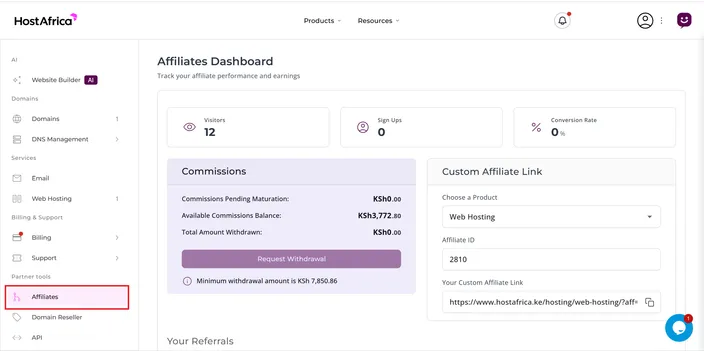
📌 Pro tip: Bookmark your dashboard for quick access to your affiliate statistics and earnings.
How to Copy Your Referral Link
Once inside the dashboard, your unique referral link will be displayed clearly. It looks like this:
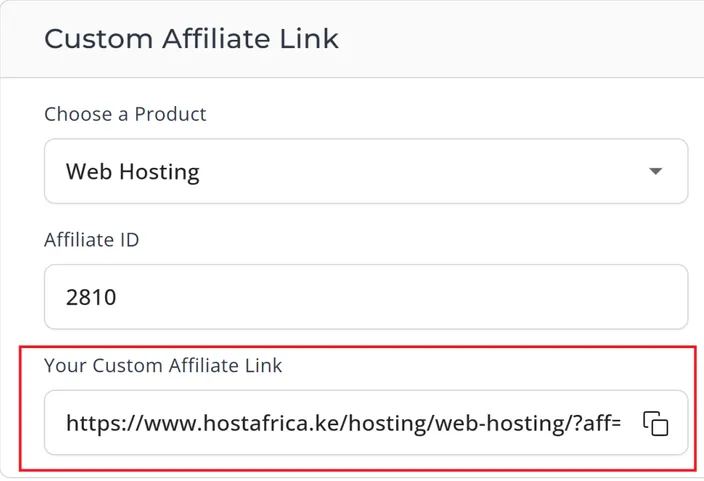
This special link tracks every person who clicks, signs up, and buys hosting via your referral. It’s how HostAfrica knows to pay you.
Use your referral link anywhere:
- WhatsApp and Telegram groups
- Blog articles and website banners
- YouTube video descriptions
- Instagram and TikTok bios
Want to learn more? Start here:
👉 How to start earning online with HostAfrica’s Affiliate Programme in Kenya
Understanding Your Stats – Clicks, Signups, & Conversions
The affiliate dashboard gives you a breakdown of performance. Here's what each metric means:
- Visitors – Number of people who clicked your referral link
- Signups – Number of people who created accounts
- Conversions – People who made a purchase (e.g., web hosting)
- Commission – What you earn from those sales

This is your go-to affiliate link tracking tool Kenya creators use to monitor success. Watch how these numbers grow over time and optimize your strategy accordingly.
Want to boost your numbers? Pair your dashboard insights with stronger promotion. Here’s how to promote HostAfrica on social media in Kenya and earn commissions.
How to View and Understand Your Payouts
Your affiliate payout system is fully integrated into the dashboard.
Here's what you'll see:
- Pending Commissions: Awaiting approval (due to the 30-day refund window)
- Available Balance: Ready to be withdrawn
- Withdrawn Amount: Total paid out to you
Payouts are typically processed monthly. Once your commission is approved, it becomes available for withdrawal in Kenyan Shillings. Just make sure your bank or M-Pesa details are added to your account.
👉 Understanding HostAfrica Commission Rates & Payment Schedules
Bonus Tips for Kenyan Affiliates
Make the most of your dashboard with these smart tips:
- Bookmark your dashboard for easy access
- Check stats weekly to know what’s working
- Place your referral link in as many places as possible
- Share useful hosting content to drive more clicks (You can also use timely offers to make your links more appealing. If you have access to active promo codes, here’s how coupon codes can help you make your first affiliate sales.)
- Stay consistent—success builds over time
Want to avoid rookie mistakes?
👉 Avoiding Common Beginner Mistakes: 5 Affiliate Pitfalls
Ready to Track Your Commissions Like a Pro?
The affiliate dashboard users rely on is more than just a stats page, it’s the key to building a steady stream of online income. Whether you’re a student, blogger, or digital creator, learning how to use this tool puts you in control.
✅ Log in now
✅ Copy your referral link and start earning
👉 Join our Affiliate program now and start earning!